
14 KiB
Remote profile
Problem
Users want their desktop client to be in sync with profiles at their main device (presumably a mobile phone). Due to distributed nature of SimpleX chat and comprehensive encryption it is difficult to maintain up to date multi-way synchronized presentation between devices.
Solution
A typical (and expected) solution for this is running a server on a master device which will handle all the communication. Then, additional "thin" client(s) would be able to present an interface, delegating everything else to the main.
Fortunately, we already have such a protocol in our clients. CLI and GUI run a text+json RPC protocol to their chat core. CLI has a WebSocket server for it that facilitates making custom clients and bots – it won't be usable here though.
We can run this protocol over a secure channel designed specifically for this problem.
Then we can tweak clients to use this protocol instead of regular "local" profiles.
Session lifecycle
For the sake of grounding and familiarity the roles are:
- "Mobile": a master device which stores data and does the communication.
- "Desktop": UI client attached to the master.
- Discovery: a user wants to attach a desktop client to their mobile.
- Handshake: desktop and mobile establish a secure duplex session.
- Activity: desktop sends requests and receives events from mobile and updates its presentation.
- Restart: desktop should be able to re-eastablish channel unattended in the case of network winking out for a while.
- Disposal: mobile can terminate the link and permanently dispose the established session.
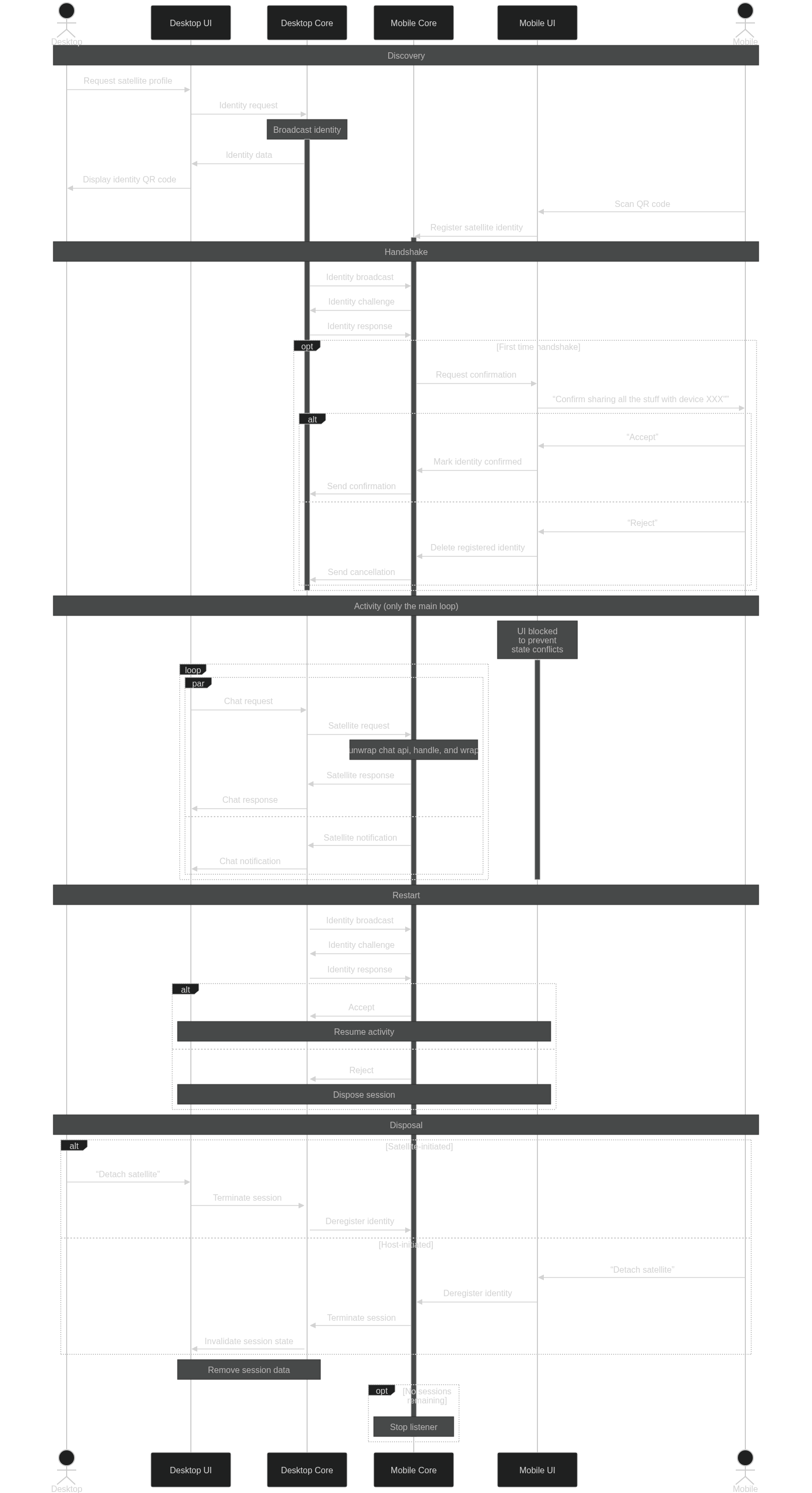
Discovery
The expected flow is desktop initiates the discovery by generating OOB key data and shows a QR code for mobile to scan. The mobile then scans that QR code, decodes the "attachment request" and spins up a network server.
There is a problem here, that the desktop doesn't know where its mobile actually located.
This can be solved in a few different ways:
- The desktop starts a server and encodes its local IP in the QR. Mobile then connects to it.
- The desktop encodes its local IP, but mobile only does a minimal client legwork, only to signal its actual location. Then the sides flip.
- The legwork may entail sending UDP datagram to desktop IP with an IP of its own.
- Another option is to use a TCP "nanoprotocol" of sending a
host:portline.
- The mobile may start announcing itself with UDP broadcasts for the duration of the phase (bluetooth-style) using information in the QR code.
- A desktop may create a temporary SMP queue and show its address. The mobile then submits its server data to it.
Another option is to run the server on desktop and have mobile discover it with the help of QR code to get server identity and keys and then on the network via some protocol. Using a fixed address is suboptimal as most networks have dynamic IPs.
Handshake
The aim of this phase is to establish a TLS+cryptobox session.
TLS could be complex as we need to generate self-signed certificates on desktop (if it acts like a server). A plaintext ws connection with cryptobox encryption could be sufficient initially?
TBD
Activity
The desktop starts its chat core with a special parameter to signal that it should be using the session instead of its regular "local" database. This can be determined per user profile.
Other than that, the client behaves like it would do with a local chat state. Its chat core being handed a socket uses it to relay the chat protocol data.
The mobile, starts replaying the commands it had received on its state, maintaining a single point of truth. When a mobile receives events or replies, it mirrors them to the attached session.
Only a subset of the chat API should be available this way.
Requests like /_stop or /_db delete should be filtered out and ignored.
Some of the relayed commands (e.g. /_read chat or /_reaction) the mobile should apply to its own state too.
A simpler solution could be that while desktop client is connected mobile UI is locked. When the session terminates, mobile UI gets unlocked and refreshed.
A tweak in protocol that would reply with an event like "accepted read of X up to Y" may remove the need for such matching and interpretation.
Restart
It would be annoying to users if walking to another room and loosing WiFi connection for a few seconds would result in another QR dance.
Therefore, the non-ephemeral part of handshake material should be reused for reconnects.
TBD
Disposal
The session may have a lifetime that a desktop or a mobile may stipulate while preparing a session. Alternatively a mobile (or a desktop, why not) may signal that they're done here and no further activity should be going with the session parameters.
Proposed UX flow
For now, desktop and mobile roles are mutually exclusive. Mobile device can only host remote session, while desktop devices can only remote-control.
On a mobile device
- A user opens sidebar and clicks "use from desktop" in the "You" section, starting remote controller discovery.
- When this happens for the first time, the user must set the mobile device name, pre-filled from system device name if possible.
-
UI enters "Waiting for desktop" window, which collects all the broadcasts received so far.
- Discovery process starts UDP broadcast listener on application port (5226).
- A datagram containing remote controller fingerprint is checked against a list of pre-registered controller devices.
- If the datagram contains no valid fingerprint, it is ignored.
- For unknown/new broadcasts a fingerprint is displayed instead.
- If the device is already known, the host establishes connection and UI transitions into "connection status" window.
- Clicking on unknown device fingerprint in the list starts OOB handshake.
- UI enters "New device" window, displaying a fingerprint and asking to scan a QR code (or paste a link, like in the contact screen).
- A OOB data from the QR/link contains remote controller fingerprint and remote display name, which is stored in device DB.
- The OOB fingerprint must match the announce.
- Accepting the OOB automatically triggers remote controller connection and transitions UI to "connection status" window.
- A remote session initiated with a known device, or as a result of OOB exchange.
- A "connection status" window shows registered display name and current session status.
- Chat controller attempts to establish a remote session.
- The source adddress of the datagram is used to initiate TCP connection.
- A TCP connection is made to the address discovered.
- A TLS connection is instantiated, checking for remote CA fingerprint matches the previously established.
- A HTTP2 server is started on the mobile side of the TLS connection.
- The remote controller connects and subscribes for its output queue, marking the session established.
- For the duration of the remote session, the UI remains in the status window, preventing user interaction.
- This restriction may be lifted later.
At any time a user may click on a "cancel" button and return to the main UI. That should fully re-initialise UI state.
This screen should have a way to open the list of all known remote controllers (desktop devices), to allow removing them.
Removing remote controller means its entry will be removed from database. Future connection attempts with a removed desktop will be treated as with a previously unknown device.
On a desktop device
- A user opens sidebar and clicks "connect to mobile" in the "You" section.
- UI enters a "Select remote host" window asking user to pick an existing connection profile or generate a new one.
- When a new connection profile is requested by a user, a private key is generated and a new X509 root CA certificate is produced and stored in device DB. Then the desktop proceeds to the connection screen.
- Clicking on an existing connection profile transitions UI to "connecting to remote host" window.
- For a first-time connection a QR code / link is presented, containing the fingerprint of the CA stored for the selected profile.
- After first time the QR code is hidden until a subdued "show QR code" button is clicked. This is to prevent user confusion that they have to scan the code every time.
- A new session certificate is derived from the CA.
- A TLS server is started using ephemeral session certificate.
- TLS handshake is used to authenticate desktop to a connecting mobile, proving that the announcer is indeed owns the key with the fingerprint received OOB by mobile. See below for a case for mutual authentication.
- A periodic UDP broadcast on port 5226 is started, sending the fingerprint.
- When an incoming connection is established the UI transitions to "connected to remote host" window.
- The announcer is terminated and TCP server stops accepting new connections.
- Desktop chat controller establishes a remote session over the tls session.
- UI transitions to the "remote host" mode, shunting local profiles into background while keeping notifications coming.
- A user may open sidebar and click "disconnect from mobile" to close the session and return to local mode.
- That should fully re-initialise UI state.
Unlike mobile UI, removing known mobiles should happen via the same screen that shows connected mobile deivices.
Removing a remote host means its entry will be removed from database and any associated files deleted (photos, voice messages, transferred files etc).
Caveats
A public WiFi spot (or a specially configured home AP) may prohibit clients to connect with each other, denying them link-local connection. n such an event, an alternative transports may be considered:
- Bluetooth link.
- USB tethering that presents an ethernet device.
- The usual NAT traversal techniques.
- Running localnet-providing VPNs.
- Routing chat traffic via SMP queues.
Application chat traffic may end up too chatty for the link. This may result in large power drain for both sides or unpleasant latency. Compression protocols may be used to mitigate this. Since we know that chat API is text+JSON Zstd compression with pre-shared dictionary may provide huge traffic savings with minimal CPU effort.
There is a threat, that a device in the broadcast range may intercept discovery datagrams and eagerly connect to their sources. In the case of such a "honeypot", a desktop may be tricked into receiving arbitrary contacts, messages and files from the remote host. Some mitigations are possible for authenticating a remote host (like using OOB token as a cookie or exchanging it for a TLS client certificate). This is intentionally left out of scope for now, until the "remote profiles" system is audited, to be resolved in a wider context.
Requesting a list of IP addresses is problematic. A shady app permission is required from the OS (ACCESS_NETWORK_STATE on Android). And then the app needs to sort through all the found interfaces and guess which one would be accessible.
"Should-works"
File transfer appears to be running within the chat protocol.
UI assumes that files are available in a local storage, the access to files is not part of chat RPC. This complicates things a lot.
Attaching multiple sessions appears to be realistic without extensive modifications.
A headless client with a global address (e.g. VPN or TOR) may be used in a manner of IRC bouncers.
This may also allow "thin" mobile clients (cf. traffic concerns) and browser apps.
A backup system may be implemented by attaching a headless app to a bouncer as one of the sessions.
The unauthenticated remote host can be considered a feature. A use case for that may be something like a "dead drop" host that wakes up in response to any discovery broadcast.
Other questions
- What to do with WebRTC/calls?
Calls use local desktop implementation, they will use host for signalling.
- Do we want attaching only to a subset of profiles?
No.
- Do we want a client to mix remote and local profiles?
No.
- Do we want M-to-N sessions? (follows naturally from the previous two)
No.