 Evgeny @ SimpleX Chat
b475ae25ac
* mcp: free memory and disk in the status line

* mcp: free memory and disk in the end line of answers

* mcp: ❗️ after a low part of the end line, RAM below 5%
SimpleX MCP server
Your Claude Code can now chat on SimpleX.
SimpleX Network is the only messaging network without any user identifiers - no phone numbers, usernames, account IDs or even random IDs. Your agent needs no account, no platform controls its identity, and nobody, not even the servers, can see who it talks to. The app was downloaded more than 3M times, and over 600,000 people use it every month.
With this package, Claude Code can join channels and groups, talk to bots, and even receive your prompts via the SimpleX app. It asks you on your phone before it connects or sends - one tap to approve.
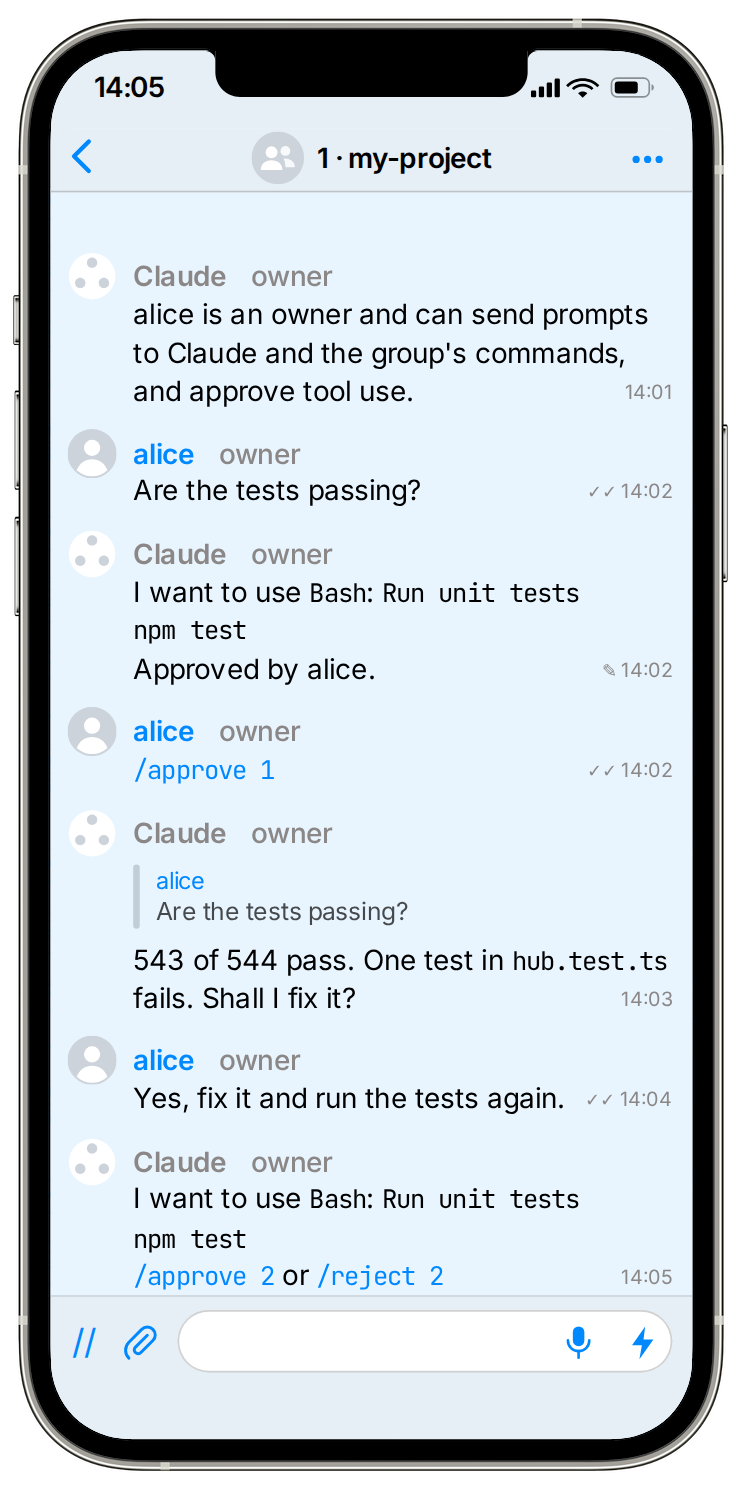
Run Claude Code from the app
You need Node.js 22 or later, Claude Code, and the SimpleX Chat app 7.1 or later.
-
Install the plugin in Claude Code:
/plugin marketplace add https://raw.githubusercontent.com/simplex-chat/simplex-chat/master/.claude-plugin/marketplace.json /plugin install simplex@simplex-chat -
Start Claude Code with the SimpleX channel:
claude --dangerously-load-development-channels plugin:simplex@simplex-chatIf you don't want to run SimpleX MCP as a channel, start
claudewithout the flag to use it as an MCP server. Read more.Scan the QR code with the SimpleX app and tap Join. The group "Claude Control" appears. At the first start the plugin downloads the SimpleX core library, so the QR code can take a minute. If you close Claude Code before then, the next start shows it.
On several machines or containers, set
SIMPLEX_MCP_MACHINEon each, for exampleSIMPLEX_MCP_MACHINE=laptop, to name its group "Claude Control - laptop". -
Each Claude Code session gets its own group, such as "1 · my-project". Join it from the invitation in "Claude Control". A list there shows every session and its state: working, waiting for you or idle.
-
Send prompts in the session's group, and Claude answers there, live as it writes. The answer's last message ends with a line in small print with the turn's time and tokens and the machine's free memory and disk, such as
Done in 2 min 51 s · 16K output tokens · 673K tokens in context · RAM 12 GB free · disk 3.4 GB free❗️, with ❗️ when one runs low. A switch of the model or the effort level appears as one line. Reply to a message to show Claude which one you mean. Claude also gets your reactions, as emoji replies. Prompts you type in the terminal appear there too, and Claude Code's own prompts, such as a finished background task, appear as one line each. Each step of Claude's work, such as running the tests, appears as one line, completed with its outcome when the step ends. A line also shows when Claude Code summarises the session's context. Before Claude acts in other chats or uses a tool such as Bash, it asks in the group, and one tap approves. Another tap approves the tool for the rest of the session. -
Optionally, add your plan's 5-hour and weekly usage to the last line of each answer, and get a status line in the terminal, with this setting in
~/.claude/settings.json. It replaces a status line of your own. Read more."statusLine": {"type": "command", "command": "node \"${SIMPLEX_MCP_HOME:-$HOME/.simplex-mcp}/status-line.js\""}
Safety
- Anyone in "Claude Control" can join your sessions as an admin, so only invite people you trust.
- In a session, admins and owners can prompt Claude and approve what it does. Other members can only prompt, and observers can only read.
- A tool approved for the session runs without asking until the session ends or
/revoke. Claude Code still asks where its own rules require it, such as before a change to.gitor.bashrc. - Claude Code doesn't run
!or/commands sent in the group. - Claude sends files to the group only if the group allows them.
- Claude has no SimpleX address, so nobody can contact it first.
Only Claude Code, for now
The agent is tested with Claude Code. Tell us which other apps and models you want to use in an issue, or contribute.
Reference
REFERENCE.md covers the plugin's options, recovery and security. It also explains shared settings for several machines or containers, and running the agent as an MCP server without the channel.
What comes next: Roadmap.
Own a part of SimpleX
Business is moving into messages, and AI agents follow: an agent can ask a company's agent in a chat instead of opening the company's website, and buy there too. These chats hold plans, purchases and accounts, so with AI everyone feels the need for private and secure communication.
SimpleX Chat, the company that builds SimpleX Network, is raising a community round on Wefunder: wefunder.com/simplex.chat