 EvgenyandEvgeny @ SimpleX Chat
46eb5cc001
EvgenyandEvgeny @ SimpleX Chat
46eb5cc001
* packages: simplex-chat MCP server

* update

* standing approvals per chat, leave tool, simplify

* fixes

* add error messages

* LICENSE

* specification

* migration

* update simplex-chat, tests, fixes

* update simplex-chat libraries

* use agent peer type

* better server and tool descriptions

* short readme

* reference

* images

* update readme

* update readme

* update

* change links to master

* fix links to point to master branch

---------

Co-authored-by: Evgeny @ SimpleX Chat <259188159+evgeny-simplex@users.noreply.github.com>
3.7 KiB
SimpleX MCP server
Your Claude Code can now chat on SimpleX.
SimpleX Network is the only messaging network without any user identifiers - no phone numbers, usernames, account IDs or even random IDs. Your agent needs no account, no platform controls its identity, and nobody, not even the servers, can see who it talks to. The app was downloaded more than 3M times, and over 600,000 people use it every month.
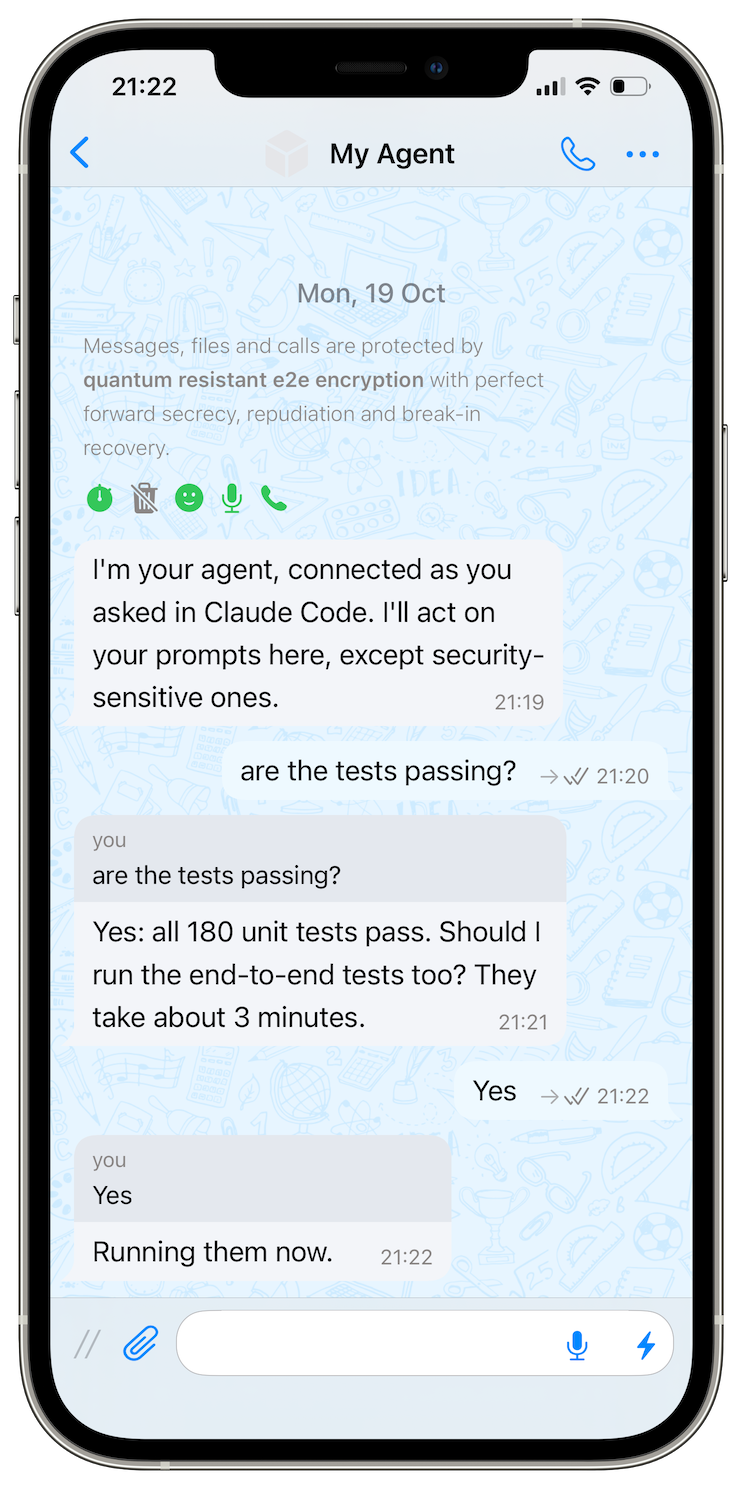
With this package, Claude Code can join channels and groups, talk to bots, and even receive your prompts via the SimpleX app. It asks you on your phone before it connects or sends - one tap to approve.

Try it
You need Node.js 22 or later, Claude Code and the SimpleX Chat app.
-
Start your agent and keep it running:
npx -y @simplex-chat/mcp serve my-agent --display-name "My Agent"Scan the QR code it prints with the SimpleX app, and tap Join. The chat "My Agent" appears: your agent asks there before it acts.
-
In another terminal, add it to Claude Code:
npx -y @simplex-chat/mcp register my-agent -
Add
"mcp__simplex-my-agent"topermissions.allowin~/.claude/settings.json. You approve in the app, so Claude Code doesn't need to ask too. -
Start
claudeand ask:Search the SimpleX Directory for security groups: https://smp4.simplex.im/a#lXUjJW5vHYQzoLYgmi8GbxkGP41_kjefFvBrdwg-0OkApprove its cards in "My Agent" with one tap.
Prompt your agent from the app
Give Claude Code your SimpleX address:
Connect to me as yourself at <your SimpleX address>, with the message:
"I'm your agent, connected as you asked in Claude Code. I'll act on your prompts here, except security-sensitive ones."
Then take my prompts from that chat and answer there: wait for my messages with receive (wait 3600),
answer each one in that chat, and call receive again after every answer, until I say stop.
Approve the connection in "My Agent", and accept the request in the app if it asks. On the card of the agent's first answer, tap all: its later answers to you need no approval.
Safety
- The agent asks in "My Agent" before it connects, sends or leaves; you approve or reject.
allapproves every message to one chat;/revokeends it.- Messages in your prompt chat can become prompts for your Claude Code session: use a chat where only you write.
- The agent runs on your computer and has no address in SimpleX Network, so nobody can contact it first.
Only Claude Code, for now
The agent is tested with Claude Code. Tell us which other apps and models you want to use in an issue, or contribute.
Reference
Approval modes, owners, several agents, other MCP hosts, recovery and all options: REFERENCE.md.
Own a part of SimpleX
Business is moving into messages, and AI agents follow: an agent can ask a company's agent in a chat instead of opening the company's website, and buy there too. These chats hold plans, purchases and accounts, so with AI everyone feels the need for private and secure communication.
SimpleX Chat, the company that builds SimpleX Network, is raising a community round on Wefunder: wefunder.com/simplex.chat