 HoggorminoandClaude Opus 5
146744de98
HoggorminoandClaude Opus 5
146744de98
sdkconfig.defaults asked for a USB-Serial-JTAG console, but the ESP32-S2
has no such peripheral: the option depends on SOC_USB_SERIAL_JTAG_SUPPORTED,
which esp32s2 does not define. The choice therefore fell back to
ESP_CONSOLE_UART_DEFAULT, so boot and WiFi logs went out on UART0 at
115200 before wifi_link_init() switched it to 230400. That is the same
wire the framed protocol uses, and a log line printed mid-frame corrupts
it; the FAP then drops the frame on the CRC check.

- Select CONFIG_ESP_CONSOLE_NONE, as the Flipper's own devboard firmware
  does. Verified in the generated sdkconfig, not just the defaults file.
- Rename CONFIG_ESP32_WIFI_*_BUFFER_NUM to CONFIG_ESP_WIFI_*, which
  ESP-IDF v5.2 warned about on every build.
- wifi_link.c described UART1 on GPIO17/18. The code uses UART0, whose
  default pins are the ones wired to the Flipper header.

Co-Authored-By: Claude Opus 5 <noreply@anthropic.com>


TagTinker V2.1
Infrared ESL Research Toolkit for Flipper Zero
Protocol study • Signal analysis • Digital Art



→ Launch the TagTinker Image Prep web app ←
Overview
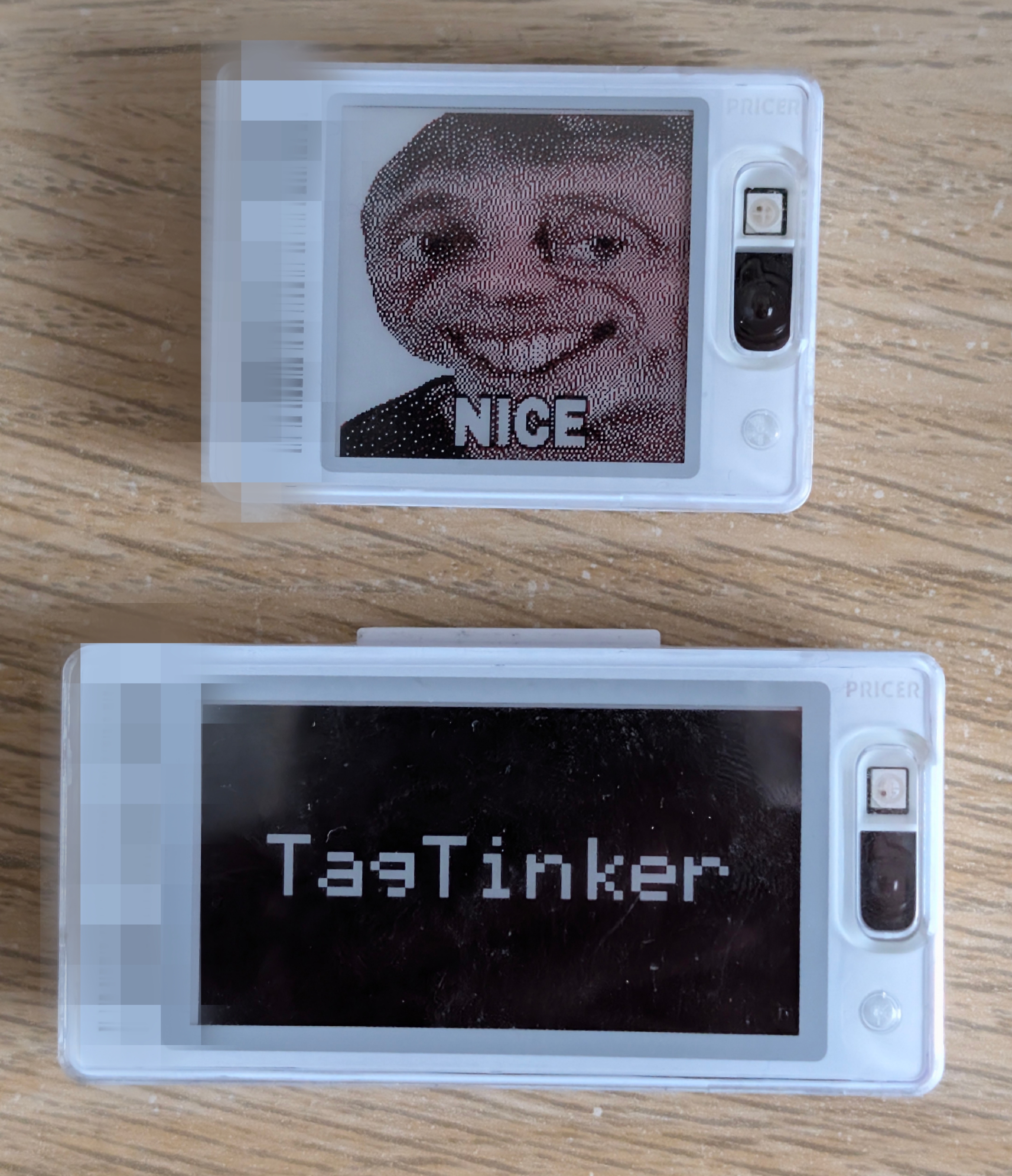
TagTinker is a Flipper Zero app for exploring infrared electronic shelf-label (ESL) protocols. It allows you to transmit custom images and text to supported graphics tags. A companion web image preparer runs entirely in the browser and lets you drop, dither and download Flipper-ready BMPs without any install.
As the Flipper Zero team notes:
"FYI: this is pure infrared signal, same that you use in TV remotes. The whole security was relying on obscurity of protocol."
This tool is built for IoT security curiosity, learning about obscure protocols, and displaying digital art on e-ink hardware.
Warning
Hardware Warning: Many infrared ESL tags store their firmware, address, and display data in volatile RAM to save cost and energy. If you remove the battery or let it fully discharge, the tag will lose all programming and become unresponsive ("dead"). It usually cannot be recovered without the original base station.
Features
-
TagTinker Flipper App: High-performance, zero-allocation RLE streaming IR engine.
-
TagTinker Image Prep (web): Single-file, dependency-free HTML page that lists every supported tag profile, runs a full image pipeline (tone, contrast, detail, sharpen, dither, photo-grade Oklab 3-colour quantisation) and exports a Flipper-ready BMP. Hosted at i12bp8.github.io/TagTinker (source:
web-image-prep/). -
Drop-folder image flow: Drop a prepared BMP into
apps_data/tagtinker/dropped/on the Flipper SD card, then openTargeted Payloads → <tag> → Set Imageand pick it. The Flipper rescales any BMP on the fly so a single file can target any tag and any page. -
NFC Tag Scan: Instantly identify ESL targets by scanning their NFC tag — no manual barcode entry needed.
-
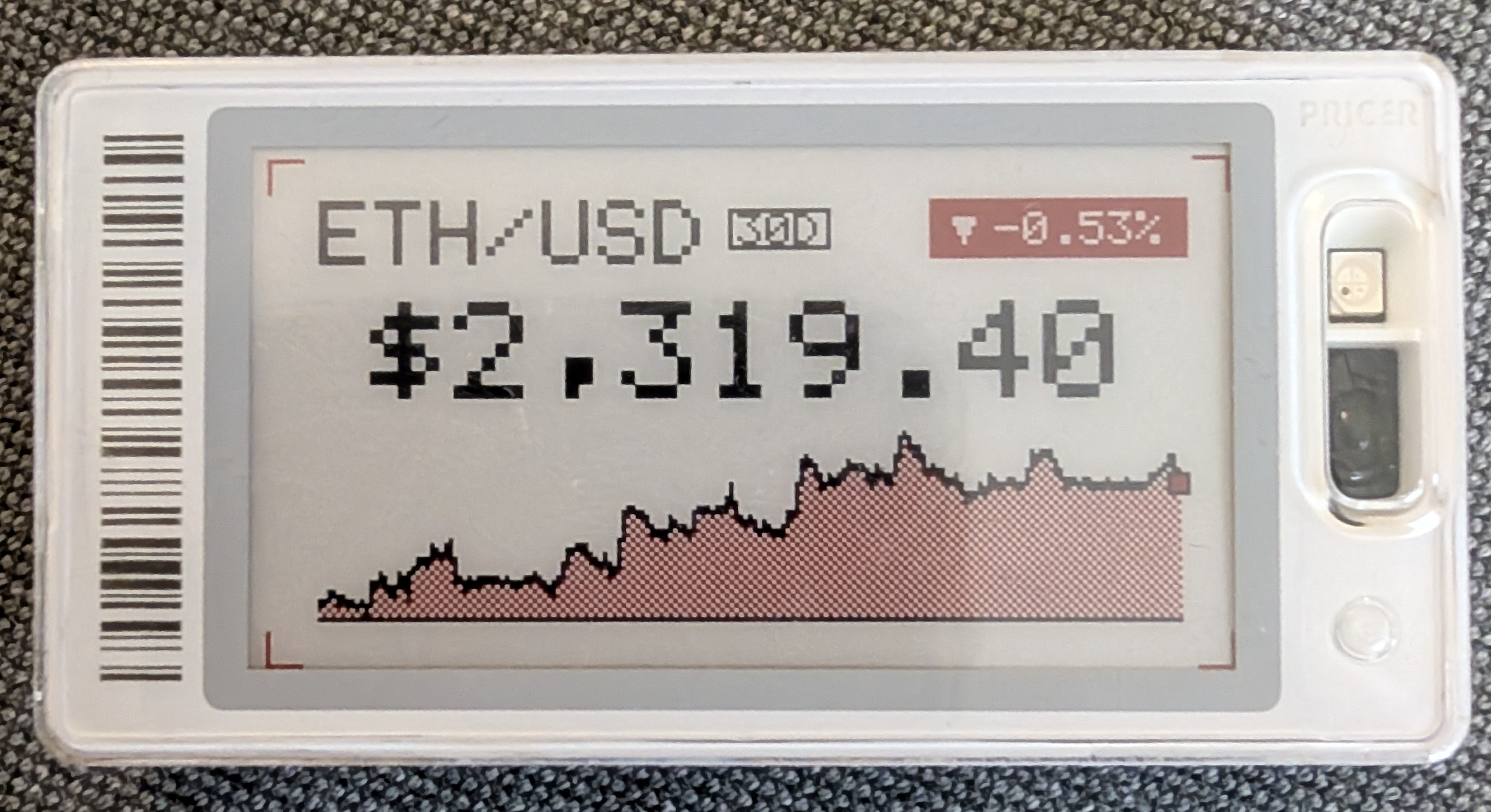
WiFi Plugins (optional): Plug a Flipper WiFi Dev Board (ESP32-S2) into the GPIO header to unlock live, network-rendered tag designs — crypto price cards, weather tiles, identicons, and more — auto-discovered by the FAP. New plugins live entirely on the cloud worker; the Flipper firmware never has to be re-flashed to add one.
-
Display text, custom images, and test-patterns.
-
Support for monochrome and accent-color (red/yellow) graphics tags.
Getting Started
- Build the Flipper app from this repository and install it via
ufbt. The first launch createsapps_data/tagtinker/dropped/on your SD card. - Open i12bp8.github.io/TagTinker in any browser, pick your tag profile, drop an image, tweak, and download the BMP.
- Copy the BMP into
apps_data/tagtinker/dropped/on the SD card (overqFlipper, USB MTP, or whatever you use). - On the Flipper open
Targeted Payloads → <your tag> → Set Image, pick the BMP, choose a page, send.
FAQ
Does this require a Flipper Zero?
No, not at all! You can do this with less than $5 worth of microcontroller hardware (like an ESP32 and an IR LED). The Flipper Zero just happens to be my favorite security research tool, which is why I built the app for this platform.
Where is the .fap release?
The Flipper app is source-first. Build the .fap yourself from this repository with ufbt so it matches your firmware and local toolchain.
What if it crashes or behaves oddly?
If you are using a custom firmware branch, custom asset packs, or a heavily modified device setup, start by testing from a clean baseline firmware.
Credits & Background
This project is deeply indebted to the incredible public reverse-engineering work by furrtek. To understand the underlying protocol, signal structure, and history, please read his research:
- Furrtek’s ESL research: https://www.furrtek.org/?a=esl
- PrecIR reference implementation: https://github.com/furrtek/PrecIR
NFC tag decoding contributed by 7h30th3r0n3.
Disclaimer
Caution
STRICTLY PROHIBITED FOR ILLEGAL USE
TagTinker is an independent project intended strictly for educational research, security curiosity, and displaying digital art on hardware that you legally own.
Under no circumstances is this software allowed to be used for illegal activities. You are strictly prohibited from using TagTinker to alter retail displays, modify electronic shelf labels in stores, interfere with third-party infrastructure, or cause any form of vandalism or financial harm.
The creator of TagTinker assumes absolutely no liability for any misuse of this software. By using this software, you agree to take full responsibility for your actions and use it responsibly and legally.
License
Licensed under the GNU General Public License v3.0 (GPL-3.0). See the LICENSE file for details.