mirror of
https://github.com/simplex-chat/simplexmq.git
synced 2026-04-27 12:55:16 +00:00
 Evgeny Poberezkin
33de5f6fec
Evgeny Poberezkin
33de5f6fec
* include migrations in the package, update versions

* update DigitalOcean version
106 lines
8.5 KiB
Markdown
106 lines
8.5 KiB
Markdown
# SimpleXMQ
|
|
|
|
[](https://github.com/simplex-chat/simplexmq/actions?query=workflow%3Abuild)
|
|
[](https://github.com/simplex-chat/simplexmq/releases)
|
|
|
|
## Message broker for unidirectional (simplex) queues
|
|
|
|
SimpleXMQ is a message broker for managing message queues and sending messages over public network. It consists of SMP server, SMP client library and SMP agent that implement [SMP protocol](https://github.com/simplex-chat/simplexmq/blob/master/protocol/simplex-messaging.md) for client-server communication and [SMP agent protocol](https://github.com/simplex-chat/simplexmq/blob/master/protocol/agent-protocol.md) to manage duplex connections via simplex queues on multiple SMP servers.
|
|
|
|
SMP protocol is inspired by [Redis serialization protocol](https://redis.io/topics/protocol), but it is much simpler - it currently has only 8 client commands and 6 server responses.
|
|
|
|
SimpleXMQ is implemented in Haskell - it benefits from robust software transactional memory (STM) and concurrency primitives that Haskell provides.
|
|
|
|
## SimpleXMQ roadmap
|
|
|
|
- SMP queue redundancy and rotation in SMP agent duplex connections.
|
|
- SMP agents synchronization to share connections and messages between multiple agents (it would allow using multiple devices for [simplex-chat](https://github.com/simplex-chat/simplex-chat)).
|
|
- Streams - high performance message queues. See [Streams RFC](https://github.com/simplex-chat/simplexmq/blob/master/rfcs/2021-02-28-streams.md) for details.
|
|
|
|
## Components
|
|
|
|
### SMP server
|
|
|
|
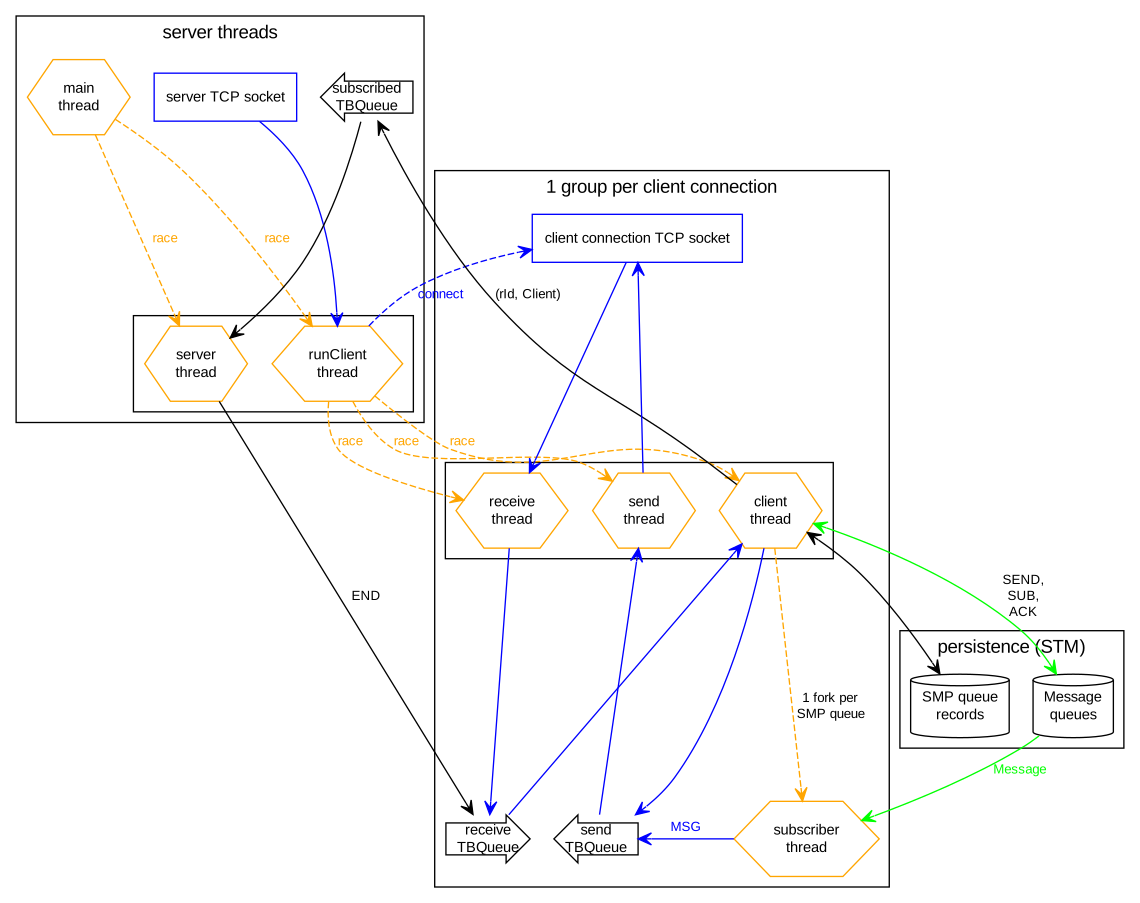
[SMP server](https://github.com/simplex-chat/simplexmq/blob/master/apps/smp-server/Main.hs) can be run on any Linux distribution without any dependencies. It uses in-memory persistence with an optional append-only log of created queues that allows to re-start the server without losing the connections. This log is compacted on every server restart, permanently removing suspended and removed queues.
|
|
|
|
To enable the queue logging, uncomment `enable: on` option in `smp-server.ini` configuration file that is created the first time the server is started.
|
|
|
|
On the first start the server generates an RSA key pair for encrypted transport handshake and outputs hash of the public key every time it runs - this hash should be used as part of the server address: `<hostname>:5223#<key hash>`.
|
|
|
|
SMP server implements [SMP protocol](https://github.com/simplex-chat/simplexmq/blob/master/protocol/simplex-messaging.md).
|
|
|
|
### SMP client library
|
|
|
|
[SMP client](https://github.com/simplex-chat/simplexmq/blob/master/src/Simplex/Messaging/Client.hs) is a Haskell library to connect to SMP servers that allows to:
|
|
- execute commands with a functional API.
|
|
- receive messages and other notifications via STM queue.
|
|
- automatically send keep-alive commands.
|
|
|
|
### SMP agent
|
|
|
|
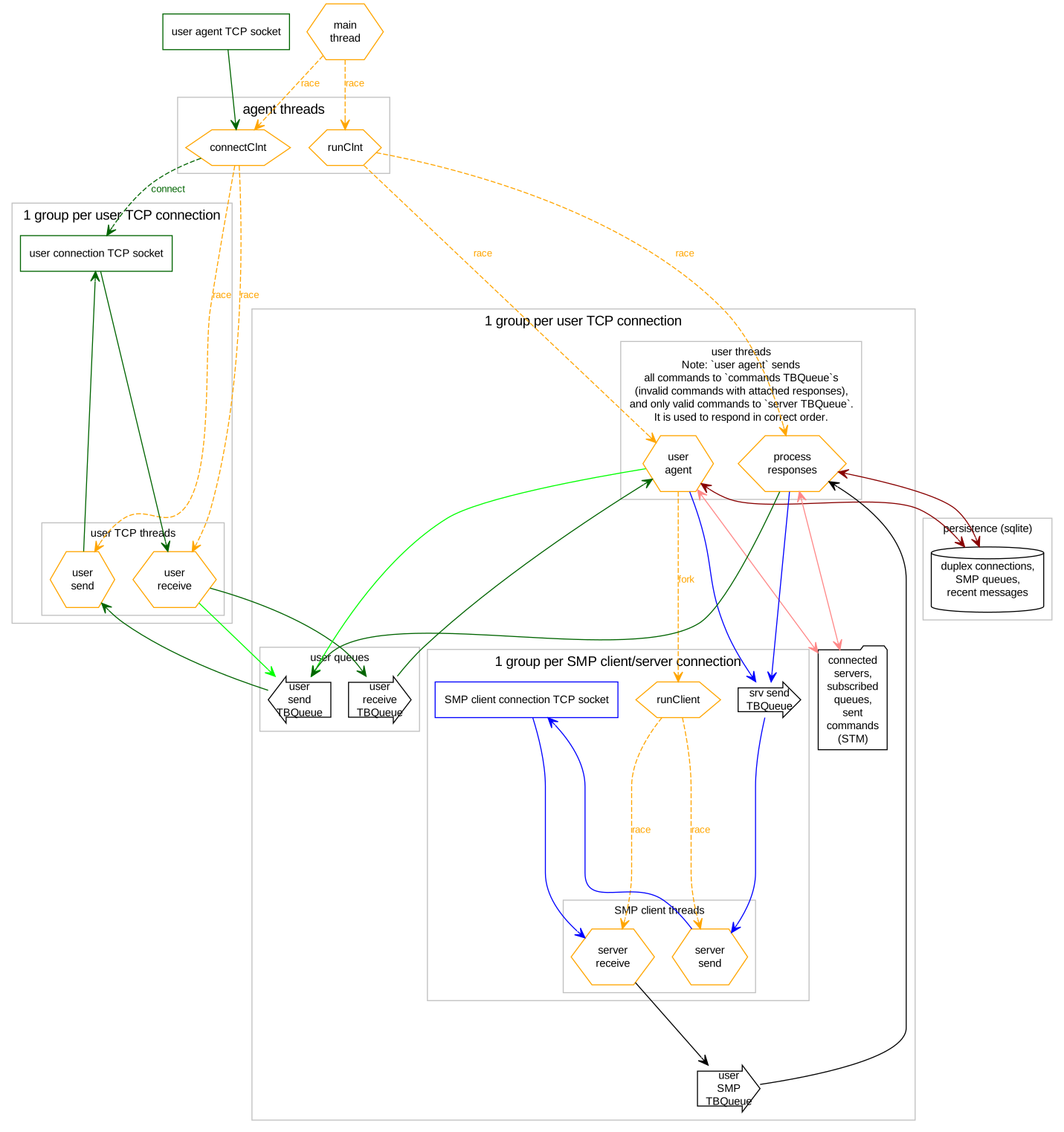
[SMP agent library](https://github.com/simplex-chat/simplexmq/blob/master/src/Simplex/Messaging/Agent.hs) can be used to run SMP agent as part of another application and to communicate with the agent via STM queues, without serializing and parsing commands and responses.
|
|
|
|
Haskell type [ACommand](https://github.com/simplex-chat/simplexmq/blob/master/src/Simplex/Messaging/Agent/Protocol.hs) represents SMP agent protocol to communicate via STM queues.
|
|
|
|
See [simplex-chat](https://github.com/simplex-chat/simplex-chat) terminal UI for the example of integrating SMP agent into another application.
|
|
|
|
[SMP agent executable](https://github.com/simplex-chat/simplexmq/blob/master/apps/smp-agent/Main.hs) can be used to run a standalone SMP agent process that implements plaintext [SMP agent protocol](https://github.com/simplex-chat/simplexmq/blob/master/protocol/agent-protocol.md) via TCP port 5224, so it can be used via telnet. It can be deployed in private networks to share access to the connections between multiple applications and services.
|
|
|
|
## Using SMP server and SMP agent
|
|
|
|
You can either run your own SMP server locally or deploy using [Linode StackScript](#deploy-smp-server-on-linode), or try local SMP agent with the deployed servers:
|
|
|
|
`smp2.simplex.im#z5W2QLQ1Br3Yd6CoWg7bIq1bHdwK7Y8bEiEXBs/WfAg=` (London, UK)
|
|
`smp3.simplex.im#nxc7HnrnM8dOKgkMp008ub/9o9LXJlxlMrMpR+mfMQw=` (Fremont, CA)
|
|
|
|
It's the easiest to try SMP agent via a prototype [simplex-chat](https://github.com/simplex-chat/simplex-chat) terminal UI.
|
|
|
|
[<img alt="Linode" src="https://raw.githubusercontent.com/simplex-chat/simplexmq/master/img/linode.svg" align="right" width="200">](https://cloud.linode.com/stackscripts/748014)
|
|
|
|
## Deploy SMP server on Linode
|
|
|
|
You can get Linode [free credits](https://www.linode.com/lp/affiliate-referral/?irclickid=02-QkdTEpxyLW0W0EOSREQreUkB2DtzGE2lGTE0&irgwc=1&utm_source=impact) to deploy SMP server.
|
|
|
|
Deployment on [Linode](https://www.linode.com/) is performed via StackScripts, which serve as recipes for Linode instances, also called Linodes. To deploy SMP server on Linode:
|
|
|
|
- Create a Linode account or login with an already existing one.
|
|
- Open [SMP server StackScript](https://cloud.linode.com/stackscripts/748014) and click "Deploy New Linode".
|
|
- You can optionally configure the following parameters:
|
|
- [SMP Server store log](#SMP-server) flag for queue persistence on server restart (recommended).
|
|
- [Linode API token](https://www.linode.com/docs/guides/getting-started-with-the-linode-api#get-an-access-token) for attaching server info as tags to Linode (server address, public key hash, version) and adding A record to your 2nd level domain (Note: 2nd level e.g. `example.com` domain should be [created](https://cloud.linode.com/domains/create) in your account prior to deployment). The API token access scope should be read/write access to "linodes" (to update linode tags - you need them), and "domains" (to add A record for the 3rd level domain, e.g. `smp`).
|
|
- Domain name to use instead of Linode ip address, e.g. `smp.example.com`.
|
|
- Choose the region and plan according to your requirements (for regular use Shared CPU Nanode should be sufficient).
|
|
- Provide ssh key to be able to connect to your Linode via ssh. This step is required if you haven't provided a Linode API token, because you will need to login to your Linode and get a public key hash either from the welcome message or from the file `/etc/opt/simplex/pub_key_hash` on your Linode after SMP server starts.
|
|
- Deploy your Linode. After it starts wait for SMP server to start and for tags to appear (if a Linode API token was provided). It may take up to 5 minutes depending on the connection speed on the Linode. Connecting Linode IP address to provided domain name may take some additional time.
|
|
- Get `hostname` and `hash` either from Linode tags (click on a tag and copy it's value from the browser search panel) or via ssh. Linode has a good [guide](https://www.linode.com/docs/guides/use-public-key-authentication-with-ssh/) about ssh.
|
|
- Great, your own SMP server is ready! Use `address#hash` as SMP server address in the client.
|
|
|
|
Please submit an [issue](https://github.com/simplex-chat/simplexmq/issues) if any problems occur.
|
|
|
|
[<img alt="DigitalOcean" src="https://raw.githubusercontent.com/simplex-chat/simplexmq/master/img/digitalocean.png" align="right" width="300">](https://marketplace.digitalocean.com/apps/simplex-server)
|
|
|
|
## Deploy SMP server on DigitalOcean
|
|
|
|
You can deploy SMP server using [SimpleX Server 1-click app](https://marketplace.digitalocean.com/apps/simplex-server) from DigitalOcean marketplace:
|
|
|
|
- Create a DigitalOcean account or login with an already existing one.
|
|
- Click 'Create SimpleX server Droplet' button.
|
|
- Choose the region and plan according to your requirements (cheapest Regular plan should be sufficient).
|
|
- Provide ssh key and confirm Droplet creation.
|
|
- SSH to created Droplet (`ssh root@<droplet_ip_address>`) to get SMP server public key hash - either from the welcome message or from `/etc/opt/simplex/pub_key_hash`. DigitalOcean has a good guide on [how to login to Droplet via ssh](https://docs.digitalocean.com/products/droplets/how-to/connect-with-ssh/).
|
|
- Great, your own SMP server is ready! Use `ip_address#hash` as SMP server address in the client.
|
|
|
|
Please submit an [issue](https://github.com/simplex-chat/simplexmq/issues) if any problems occur.
|
|
|
|
## SMP server design
|
|
|
|
|
|
|
|
## SMP agent design
|
|
|
|
|
|
|
|
## License
|
|
|
|
[AGPL v3](https://github.com/simplex-chat/simplexmq/blob/master/LICENSE)
|