 KostaandKonstantin Baumann
a2ea520b0c
KostaandKonstantin Baumann
a2ea520b0c
Add support for [PlantUML](http://plantuml.com/guide) based network graphs, which can be pasted into [this online editor](https://www.planttext.com/). The test configuration used for unit testing for example produces this output: 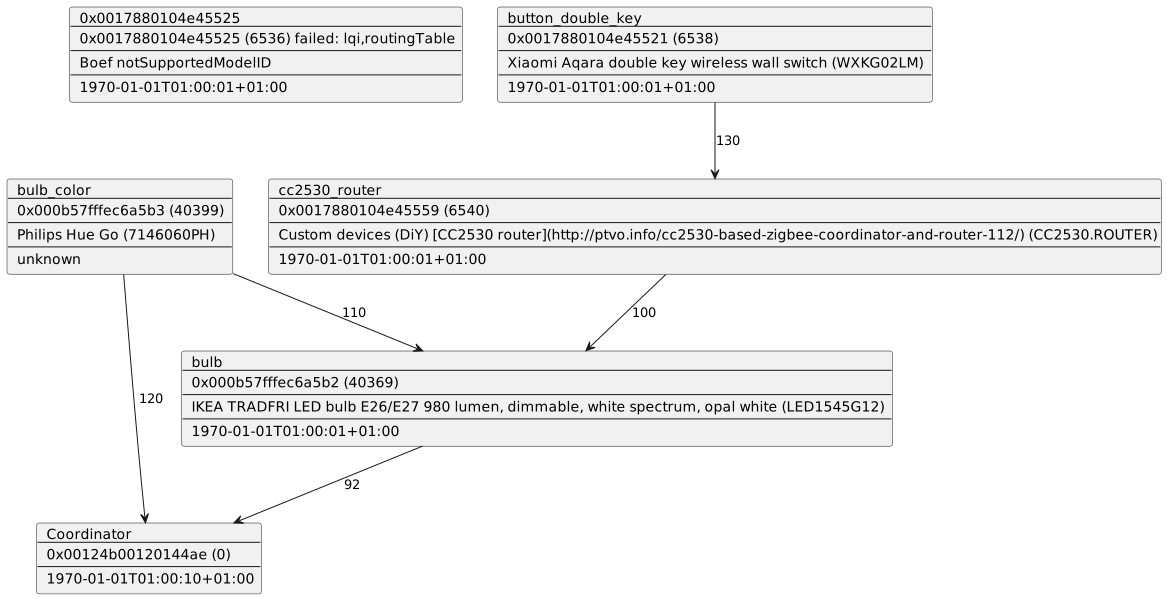 The generated script looks like this: ``` ' paste into: https://www.planttext.com/ @startuml card 0x0017880104e45525 [ 0x0017880104e45525 --- 0x0017880104e45525 (6536) failed: lqi,routingTable --- Boef notSupportedModelID --- 1970-01-01T01:00:01+01:00 ] card 0x000b57fffec6a5b2 [ bulb --- 0x000b57fffec6a5b2 (40369) --- IKEA TRADFRI LED bulb E26/E27 980 lumen, dimmable, white spectrum, opal white (LED1545G12) --- 1970-01-01T01:00:01+01:00 ] card 0x000b57fffec6a5b3 [ bulb_color --- 0x000b57fffec6a5b3 (40399) --- Philips Hue Go (7146060PH) --- unknown ] card 0x0017880104e45521 [ button_double_key --- 0x0017880104e45521 (6538) --- Xiaomi Aqara double key wireless wall switch (WXKG02LM) --- 1970-01-01T01:00:01+01:00 ] card 0x0017880104e45559 [ cc2530_router --- 0x0017880104e45559 (6540) --- Custom devices (DiY) [CC2530 router](http://ptvo.info/cc2530-based-zigbee-coordinator-and-router-112/) (CC2530.ROUTER) --- 1970-01-01T01:00:01+01:00 ] card 0x00124b00120144ae [ Coordinator --- 0x00124b00120144ae (0) --- 1970-01-01T01:00:10+01:00 ] 0x000b57fffec6a5b3 --> 0x00124b00120144ae: 120 0x000b57fffec6a5b2 --> 0x00124b00120144ae: 92 0x000b57fffec6a5b3 --> 0x000b57fffec6a5b2: 110 0x0017880104e45559 --> 0x000b57fffec6a5b2: 100 0x0017880104e45521 --> 0x0017880104e45559: 130 @enduml ``` Co-authored-by: Konstantin Baumann <konstantin.baumann@autodesk.com>








Zigbee2mqtt 🌉 🐝
Allows you to use your Zigbee devices without the vendors bridge or gateway.
It bridges events and allows you to control your Zigbee devices via MQTT. In this way you can integrate your Zigbee devices with whatever smart home infrastructure you are using.
Getting started
The documentation provides you all the information needed to get up and running! Make sure you don't skip sections if this is your first visit, as there might be important details in there for you.
If you aren't familiar with Zigbee terminology make sure you read this to help you out.
Integrations
Zigbee2mqtt integrates well with (almost) every home automation solution because it uses MQTT. However the following integrations are worth mentioning:

Home Assistant
- Hassio: Using the official addon from danielwelch
- Generic install or Hassbian: Using instructions here

Domoticz
- Integration implemented in domoticz-zigbee2mqtt-plugin
Architecture

Internal Architecture
Zigbee2mqtt is made up of three modules, each developed in its own Github project. Starting from the hardware (adapter) and moving up; zigbee-herdsman connects to your Zigbee adapter an makes an API available to the higher levels of the stack. For e.g. Texas Instruments hardware, zigbee-herdsman uses the TI zStack monitoring and test API to communicate with the adapter. Zigbee-herdsman handles the core Zigbee communication. The module zigbee-herdsman-converters handles the mapping from individual device models to the Zigbee clusters they support. Zigbee clusters are the layers of the Zigbee protocol on top of the base protocol that define things like how lights, sensors and switches talk to each other over the Zigbee network. Finally, the zigbee2mqtt module drives zigbee-herdsman and maps the zigbee messages to MQTT messages. Zigbee2mqtt also keeps track of the state of the system. It uses a database.db file to store this state; a text file with a JSON database of connected devices and their capabilities.
Supported devices
See Supported devices to check whether your device is supported. There is quite an extensive list, including devices from vendors like Xiaomi, Ikea, Philips, OSRAM and more.
If it's not listed in Supported devices, support can be added (fairly) easy, see How to support new devices.
Support & help
If you need assistance you can check opened issues. Feel free to help with Pull Requests when you were able to fix things or add new devices or just share the love on social media.